Modern warehouses require modern technology, as digital tools and information technology are used to manage the picking process and track shipments. Implementing forklift computers enables easier asset tracking and inventory control, letting you work smarter and with fewer errors. This forklift computer buyer’s guide will help you understand the key priorities when choosing a new device for your forklift fleet.
Should I Choose a Tablet or Mini PC for My Forklift Computer?
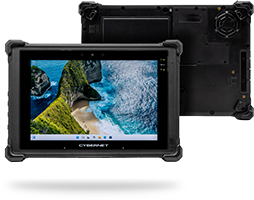
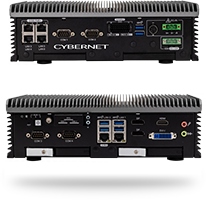
One of the first questions to consider is whether you want to use a tablet or a mini PC on your forklifts. A conventional desktop computer or panel PC is out of the question, as there simply isn’t enough room for one on a forklift. Tablets and mini PCs combine sufficient processing power with a smaller form factor that can fit in the limited workspace that a forklift provides.
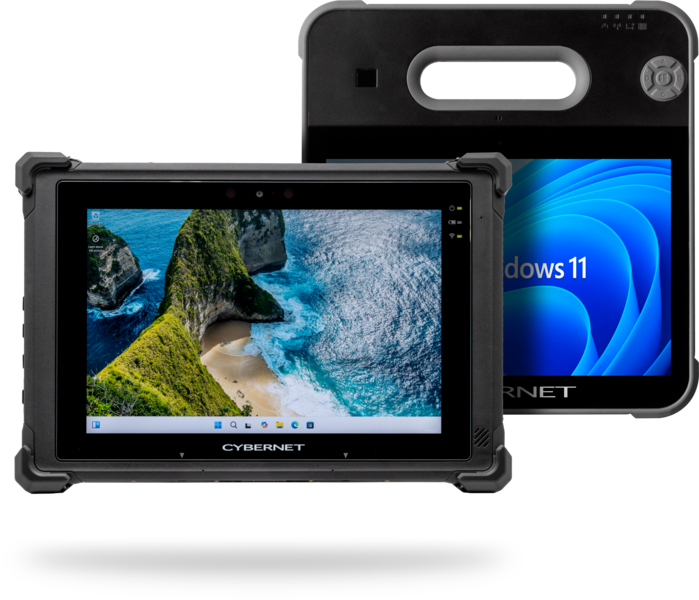
The greatest advantage of an industrial tablet is that it combines the computer and display into a single package, reducing the number of devices you need to manage. Tablets are also highly flexible and can be used in a variety of roles. For example, you could use your tablet as a forklift computer, then detach it from the mount and go on foot if your workflow requires it.
A rugged mini PC, on the other hand, is better if you just need a dedicated computer solution for the forklift. Mini PCs offer more mounting options on the forklift (since there’s no display to face the operator) and can be powered directly from the forklift itself, thanks to built-in surge protection and a wider DC input range.
Rugged Design Features Critical for Forklift Computers
A warehouse is a far cry from a quiet, air-conditioned office. When shopping for a forklift computer, look for these design features:
- Vibration resistance to handle the constant shaking and jostling from working on a forklift.
- Ingress protection to block out dirt, grime, and liquids from getting inside the casing and damaging the circuitry. An ingress protection rating of IP65 is ideal for industrial workspaces.
- Chemically-treated touchscreens that are resistant to cracks and scratches.
- Drop protection features, such as reinforced casings, to defend against mishandling.
Power Supply: Plugged In or Battery-Based?
How you power your forklift computer is another critical concern that needs to be addressed. For mini PCs, this typically means drawing power directly from the forklift itself. As previously mentioned, mini PCs are designed with built-in surge protection and power safeguards, which ensure that the PC only boots up when the power supply from the forklift is stable. This prevents power fluctuations during the forklift’s startup from damaging the mini PC or any data saved on it.
Tablets, on the other hand, lack these built-in features. There are two solutions to this issue: either use peripheral devices, such as DC converters, to power and protect the tablet, or rely on the tablet’s own batteries to keep it powered during work. If you choose the latter option, consider investing in a tablet with hot-swappable batteries. These batteries can be swapped even while the tablet is up and running, letting you replace drained units with fresh replacements as needed. This allows you to continue working with minimal interruption.
Touchscreen Controls For Easier Workflows
A forklift simply doesn’t have the space to support a mouse and keyboard. Therefore, a touch-screen interface is ideal, as it combines both a display and a user interface into one device. A rugged industrial tablet with a capacitive touch screen is perfect for this role, as it provides a highly accurate and responsive interface, letting workers fulfill orders and update inventory without having to scribble on paper notes. A mini PC will require a separate touchscreen interface to perform the same actions.
Software Compatibility
One of the most consistent hurdles for adopting a new digital device is compatibility with your pre-existing tech stack. If a tablet or computer can’t run the software your warehouse relies on, it’s obviously no use to you. For this level of enterprise software, most businesses rely on either Windows or Linux-based programs and tools, making it essential that any device you use be compatible with those operating systems.
Before you commit to a purchase, consult with your potential vendor to ensure their products support your full toolkit. If possible, work with an original equipment manufacturer who can customize their devices and the software they come with to better match your needs.
Scanning Capabilities
Any forklift computer used for inventory management or picking needs a way to update digital records so the system knows what has been added or removed from said inventory. This is usually accomplished via a barcode scanner and a scanning package or pallet labels, which are typically their own discrete devices. However, an industrial tablet can integrate the scanner into its design, reducing the overall number of tools a forklift driver has to manage and giving tablets a significant advantage as a forklift computer.
Mounting Options
Having workers just carry their forklift computer with them in their hands while also trying to operate the forklift is unsafe at best and impossible at worst. You need a reliable mounting solution to attach the computer to the forklift. The solution you choose depends on whether you use a tablet or a mini PC. For a tablet, your best solution will most likely be a VESA mount; the VESA mounting pattern is universally adopted, making it easy to find a solution that works for both your forklift and your tablet. With said mount, you can attach the tablet to it, drive your forklift, and then detach it whenever you need to go on foot.
A rugged mini PC uses a more permanent mounting solution, as you won’t be connecting/disconnecting it as often as you would a tablet. VESA-based solutions are available, as are DIN rail mounts and rack mounts. While a tablet needs to be mounted facing the user, a rugged mini PC should be mounted with easier cable management in mind. This will make it easier to detach the PC when you need to remove it from the forklift and reduce wear and tear on both the cables and the PC itself.
Forklift Computers from Cybernet Manufacturing
By following this forklift computer buyer’s guide, you should have a stronger idea of what you need and what device is right for you. Rugged, reliable, and flexible, a forklift computer can massively simplify your inventory management and picking process, leading to a smoother logistics workflow.
If you need help selecting a forklift computer, contact Cybernet Manufacturing. We’d be happy to walk you through the available options and help you determine which is best suited to your needs.