One of the greatest strengths of PCs is their modular construction. Whether for personal or business use, a user can assemble their computer with their choice of motherboard, processor, memory, and other components. But how do these various assets connect to one another? For attaching expansion cards to a motherboard, PCIE slots are the preferred choice.
What is a PCIe Slot?
Simply put, a PCIE slot is a connector on a computer’s motherboard that enables high-speed communication between different hardware components, such as GPUs, SSDs, and network cards.
Peripheral Component Interconnect Express (PCIe) is a universal interface standard for connecting a computer’s components to each other. PCIe is the latest iteration of PCI, which has existed since 1990, and is designed to offer faster speeds than previous iterations. PCIe has been iterated and improved on multiple times over the years, with PCIe 6.0’s technical specifications released in 2022. Further improvements with PCIe 7.0 and 8.0 are already planned for the future. Regardless, PCIe slots are a universal fixture on computers of all kinds, from dedicated gaming rigs to rugged industrial computers.
PCIe Formats
PCIe slots come in different sizes, with the most common being x1, x4, x8, and x16. There are also x32 slots, but they are extremely rare and used only in highly specialized roles. These numbers indicate how many data lanes are available for communication. A PCIe x1 slot has one data lane for transmitting information, while a PCIe x4 slot has four data lanes, and so on. More data lanes mean higher potential performance, so slots with more lanes are typically used in more demanding applications.
How Are PCIe Slots Used?
PCIe slots are used to connect a wide variety of computer components to the motherboard. Two notable exceptions are the CPU and RAM, which require specialized sockets to connect to the motherboard. Beyond these exceptions, however, PCIe slots support computer hardware such as:
Graphics Cards
Graphical processing units (GPUs) are a critical component in numerous computers. Dedicated gaming PCs rely on them for high-definition graphics. Still, outside of entertainment, GPUs are vital for roles that require intricate, detailed 3D rendering, such as architects creating 3D models of their buildings or graphic designers and artists working on particularly intricate pieces of art. Due to the large amounts of data that dedicated graphics rendering requires, GPUs will almost always use a PCIe x16 slot to plug into the computer’s motherboard. This ensures that the GPU has enough data lanes to transmit information quickly.
GPUs are also a critical component of modern AI computing processes. This is because GPUs excel at parallel processing (where multiple calculations or processes are carried out simultaneously), which is the basis for current AI programs. Therefore, many dedicated AI box PCs will integrate GPUs into their design to handle this processing demand.
Data Storage
Modern data storage solutions, such as solid-state drives (SSDs), rely on PCIe slots on the computer’s motherboard to receive power and transmit data. In the past, SSDs were bottlenecked by older SATA interfaces, limiting their performance. Modern NVMe solutions use PCIe connections, typically PCIe x4 slots, to transmit data at speeds that can keep up with an SSD’s read/write speed. This lets SSDs dramatically outperform older hard disk drive solutions.
Network Adapters
Computers with an integrated network card or Wi-Fi adapter rely on PCIe slots to plug the card or adapter directly into the motherboard. While external network adapters that plug into the computer via other means (such as USB) are also an option, using a PCIe slot inside the PC case itself saves space externally and lets you use those ports for other peripheral devices. Using a Wi-Fi adapter installed in a PCIe slot also means you can remove it and upgrade it as technology improves. Most network cards plug into smaller PCIe slots such as x4, but larger models, such as 100GB and fiber channel cards, can go all the way up to x8 and x16.
Advantages of PCIe Slots over Other Formats
Compared to other methods for connecting components, PCIe slots boast several advantages. The most critical of these benefits include:
Greater Bandwidth
One of the greatest upsides of using PCIe slots is that they provide much more bandwidth for transferring data than other methods, such as the PCI that they replaced. A PCIe 5.0 x16 slot offers a bandwidth of 128 GB/s. This is double the bandwidth of a PCIe 4.0 x16 slot, which boasted double the bandwidth of a 3.0 x16 slot. This bandwidth dramatically improves the performance of high-speed components and prevents bottlenecks from forming, which is critical for supporting components like GPUs and SSDs.
Modularity and Universal Compatibility
PCIe slots are designed to be compatible with each other and the various components that use them. What this means is that a component normally designed for a PCIe x1 slot can also use a PCIe x4 slot, and vice versa. While this may not be the most efficient use of resources (a smaller card can’t take advantage of a larger socket’s multiple data lanes, and a larger card will get bottlenecked by a smaller socket), it still makes installing components onto a motherboard significantly easier.
Energy Efficiency
Another significant advantage of current PCIe technology is that it is much more energy-efficient. PCIe 5.0 implements various features that optimize power consumption, such as using different power states to reduce power consumption without compromising performance. PCIe slots also pair naturally with SSDs that consume less power than HDDs, minimizing GPU idle time and reducing the time and energy spent doing nothing.
PCIe-Equipped Computers from Cybernet Manufacturing
What is a PCIe slot? It is an essential part of a computer’s assembly, ensuring that power and data flow freely and efficiently between the motherboard and various components. Using the right parts with the right PCIe slots is critical for getting the most out of your computer’s performance.
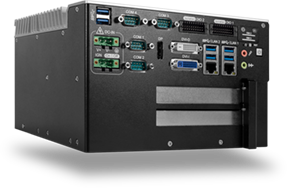
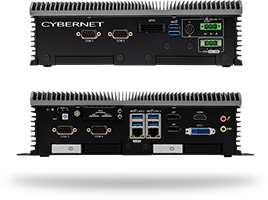
If your team or business needs medical or industrial computers with multiple PCIe slots and expert assembly, contact Cybernet Manufacturing. Our experience as an original equipment manufacturer enables us to develop customized motherboards with the optimal PCIe slot configuration for your needs.