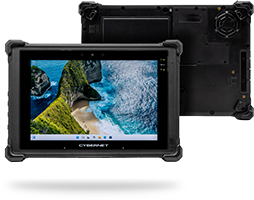
A rugged outdoor tablet or industrial panel PC is often the best solution for industrial work environments, whether on the factory floor or out in the field, thanks to their slim profile and intuitive user interfaces.
However, one of the biggest mistakes you can make is to try using a device with a consumer-grade touchscreen in these environments, rather than a superior industrial-grade option.
What is An Industrial Touchscreen?
An industrial touchscreen is a ruggedized display interface designed and manufactured specifically for harsh working environments such as warehouses, manufacturing lines, and outdoor worksites.
Unlike consumer-grade devices, industrial touchscreens are built with a suite of features, such as sealed bezels, chemically hardened glass, and enhanced brightness, to ensure performance even under threats like dust, water exposure, and harsh vibrations.
Ingress Protection on Industrial Touch Displays to Block Out Dirt and Liquids
Many industrial automation environments involve high levels of dust and airborne particles, as well as liquid spills. Both of these threats can leak in through a consumer-grade monitor to damage or destroy the vulnerable electronics behind it.
What is an industrial touchscreen’s response? It needs to be built to meet certain ingress protection ratings, typically IP65. This means that the device’s enclosure is so tight that it locks out solid matter or liquids from getting inside, making it dustproof and water-tight. This includes not just water, but harsh solvents, oils, and cleaning agents that can wreak havoc with a computer’s internals.
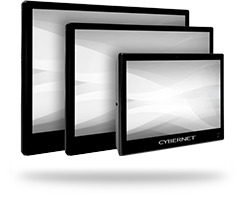
The Cybernet Advantage: We design, manufacture, and test all of our tablets and industrial touchscreen panel PCs with IP65 ratings on their front bezels. This means they are completely sealed against all solid objects down to dust particles and water jets hitting them from the front, providing a serious degree of protection for our devices.
Making Industrial Touchscreens Resistant to Cracks and Scratches
Impacts or drops are a constant threat to industrial computers and their touchscreens. Think of how often people drop their phones, and then apply that threat to an industrial work environment full of hard surfaces, higher falls, and clumsy boots that can step on them. This is why industrial computers and especially tablets (since they’re at much greater risk of being dropped or mishandled) need to have touchscreens that resist cracks and scratches.
This is accomplished by chemically treating the touchscreen’s glass in a process known as ion exchange. In this process, the piece of glass in question is submerged in a molten salt solution. While in this solution, potassium ions replace smaller sodium ions within the glass, which creates a more compressed and stronger surface.
This stronger surface is much harder to crack, chip, or scratch, making it the preferred solution for hazardous industrial roles. When attached to the LCD panel via optical bonding techniques, it provides an effective user interface without compromising on durability. It’s also why we use this chemically treated glass on all our devices with industrial touchscreen monitors, to ensure they can better handle their intended environment.
Shock and Vibration Resistance For Your Touchscreen Panel PCs
Touchscreen devices, like a rugged panel computer, are frequently used in close proximity to or directly on sources of heavy vibration, such as forklifts, stamping machines, and robots. These workspaces can literally shake a device apart if it isn’t designed and manufactured to handle them.
That’s why industrial panel PCs will use proven testing and reliability standards such as MIL-STD-810, which the military uses to evaluate its equipment. Components inside the device, such as the memory and CPU, should be securely attached or even soldered directly onto the motherboard, and internal connectors inside the casing should be tightly secured rather than allowed to hang loosely. Testing should be performed to guarantee reliability against both consistent vibrations and sudden shocks.
The Cybernet Advantage: We extensively test and certify all of our products in-house under proven standards for reliability, including MIL-STD-810 and IEC 60068, to ensure their reliability when they reach our customers.
Glare Filters To Preserve Visibility on Your Industrial Panel PC
Industrial workspaces often rely on harsh lighting to fully illuminate the work area. This is a completely reasonable decision; after all, no one would want to work near an assembly line or moving machinery in poor lighting conditions. However, this harsh lighting also creates lots of glare, which can obscure a computer’s touchscreen and make it impossible to see the information displayed on it.
The most common counter to this issue is to use an anti-glare filter applied directly to the industrial touchscreen. This film or coating helps disperse light rather than reflect it off the glass and into the user’s eyes, preserving visibility and preventing eye strain or headaches.
The Cybernet Advantage: One disadvantage of anti-glare filters is that they can be damaged by physical abrasion or chemical exposure, two threats that are much more prevalent in industrial settings. However, as an original equipment manufacturer, we can apply the anti-glare filter to the inside of the glass on your industrial monitors during the assembly process, protecting it from these threats and preserving visibility.
Sunlight-Readable Display For Outdoor Use
Similar to screen glare when indoors, the naturally brighter outdoors can obscure a device’s screen and make it impossible to use. Glare filters can help, but they aren’t enough in this situation. An outdoor tablet needs a display with high screen brightness options, preferably up to 800 nits of brightness or more. This will help the display cut through sunlight and maintain visibility, letting you continue using your device.
Capacitive vs. Resistive Industrial Touch Screen For Greater Flexibility
There are two primary types of industrial touch screens: capacitive and resistive. While they achieve the same result of creating a combined user interface and display, the technology they use to do so is different.
A capacitive touchscreen detects the electrical current in a person’s body, which it interprets as input. Resistive screens rely on physical pressure caused by the user pressing on the touchscreen, which makes two layers of plastic touch each other and register as an input.
Between the two, a capacitive touchscreen is more accurate and supports multi-touch, making it more flexible to use. A resistive touchscreen can be used while wearing gloves, which are a common fixture in industrial work environments. They also won’t register false inputs from water on the screen, which can fool capacitive touchscreens that aren’t calibrated for water rejection. Most work sites will use a mix of both, depending on the specific role the touchscreen device is meant for.
Support Your Operations with an Industrial Touchscreen Computer from Cybernet Manufacturing
Thanks to their compact design and ease of use, industrial touch displays will always play an important role in the sector. However, industrial work environments require an industrial-grade touchscreen with the rugged design and reliability features needed to withstand such harsh conditions.
Need computers and tablets with touchscreen panels designed specifically for the industrial sector? Contact Cybernet Manufacturing today to learn more about our products or request a demo unit. Our range of industrial computers and tablets is designed specifically for harsh work environments, with a 0.5% failure rate that demonstrates our commitment to quality and rugged construction.